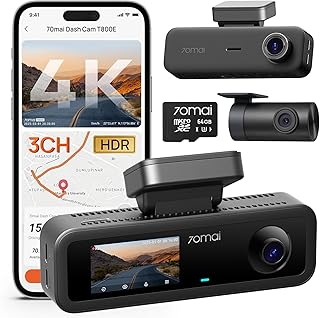
Dashcam Resolution and Night Vision Explained
It's tempting to judge a dashcam purely by its resolution number, but two cameras with identical 1440p or 4K specs can produce wildly different footage after dark. Sensor size, aperture, dynamic range, and bitrate all shape what you can actually see at night far more than the megapixel count on the box.
Why Resolution Alone Doesn't Predict Night Performance
Resolution describes how many pixels make up each frame, but it says nothing about how much light each individual pixel (photosite) can gather. A sensor squeezing 4K resolution onto a small chip has to shrink each pixel down, and smaller pixels collect less light per frame — which is precisely the opposite of what you want in low-light conditions. A well-designed 1440p or even 1080p sensor with larger pixels can outperform a cheaply implemented 4K sensor once the sun goes down.
Aperture, expressed as an f-number (such as f/1.8 versus f/2.4), is the other major factor: a lower f-number means a physically wider opening that lets in more light, which directly benefits night and low-light footage. This is why two cameras with identical resolution specs can look dramatically different after dark — the one with the wider aperture is capturing more light before any processing even happens.
Sensor size (physical dimensions of the chip, not to be confused with resolution) and pixel size are the specs to look for in more detailed product documentation if night performance matters most to you, since they explain the underlying physics that resolution numbers alone don't capture.
Dynamic Range and the License-Plate-at-Night Problem
One of the most common frustrations with dashcam footage at night is a license plate or face becoming an unreadable white blob when headlights hit it, while everything else in frame stays dark. This happens because a camera's sensor has a limited dynamic range — the gap between the darkest and brightest detail it can capture in a single exposure — and oncoming headlights can exceed that range by a wide margin.
Wide Dynamic Range (WDR) or High Dynamic Range (HDR) processing addresses this by combining multiple exposures per frame, or using per-pixel exposure techniques, to preserve detail in both the bright headlight area and the dark surroundings simultaneously. A camera with effective WDR/HDR processing will render an oncoming car's plate as legible text rather than a washed-out glare, even though the ambient scene is nearly black.
Not all WDR implementations are equally effective, and aggressive HDR processing can sometimes introduce ghosting or motion artifacts around fast-moving bright objects, so this is genuinely a case where real-world night footage samples tell you more than a spec sheet.
Bitrate, Codec, and Frame Rate: The Overlooked Specs
Bitrate — how much data is used to encode each second of video — has a major effect on how much fine detail (like license plate characters) survives compression, independent of resolution. A 1080p clip encoded at a high bitrate can retain more legible detail than a 4K clip that's been compressed aggressively to save storage space, because compression artifacts destroy the fine edges needed to read text and plates.
The video codec also matters: H.265/HEVC compresses footage more efficiently than the older H.264 standard, meaning it can preserve more quality at a given file size, but it also requires more processing power both to record and to play back, which is why some cameras and older computers struggle to smoothly play H.265 dashcam files.
Frame rate is a smaller but real factor — 30fps is standard, and bumping to 60fps can help capture a clearer single frame of a fast-moving plate or a rapid lane-change incident, at the cost of roughly doubling the storage and write-speed demands on the memory card.
Infrared Illumination for Cabin and Interior Cameras
Dual-channel dashcams with a second, cabin-facing camera (common for rideshare and delivery use) often include infrared (IR) LED illuminators so the interior can be recorded in darkness without shining a distracting visible light on the driver and passengers. IR light is invisible to the human eye but visible to the camera's sensor, which is why cabin footage taken with IR illumination often has a distinctive grayscale, low-color look.
It's important to understand that IR illumination is only effective at very short range — it's designed to light a car's interior, not the road. An IR-equipped interior camera does nothing to improve exterior night footage, and exterior road-facing lenses rely entirely on ambient light plus their sensor/aperture/WDR capabilities rather than any built-in illumination.
When comparing interior/cabin camera specs, IR range (typically measured in a few feet, matching a car's cabin depth) and IR LED count are the relevant numbers, separate from anything describing the road-facing lens.